
When I was at Citrix, I got a tap on the shoulder: “Dean, please bring GoToMyPC to end of life.”
By then, the company had sold off the rest of the GoTo product line. GoToMyPC stuck around anyway. End of sale had been announced years earlier, yet sales kept bundling it into deals to sweeten the pot. Nobody had decided what to do with it, so it just kept shuffling along.
That’s a zombie product. Every portfolio has at least one, and odds are it’s eating capacity your next big bet needs right now.
Kenny Kranseler and I dug into this in our recent webinar, the first in Productside’s Post Launch Success Series. This post covers the product sunset strategy I’ve learned the hard way: how to spot zombie products and retire them without losing the customers who still depend on them.
What Is a Zombie Product (and Why Nobody Kills It)?
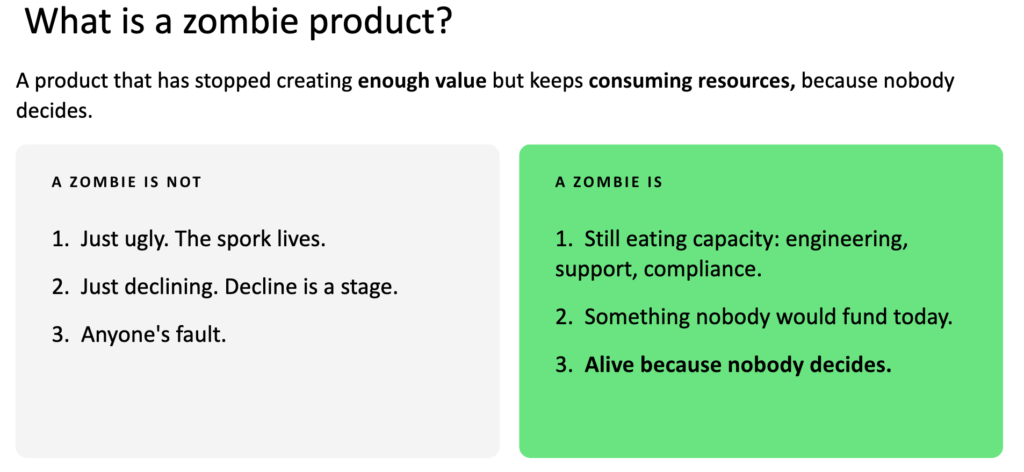
A zombie product has stopped creating enough value but keeps consuming resources, because nobody decides what to do with it. In plain terms, the orange is no longer worth the squeeze.
Before you go hunting, know what doesn’t count. An ugly product isn’t automatically a zombie. Early in his career at Kentucky Fried Chicken, Kenny was asked to kill the spork because PepsiCo thought it made the brand look dated. He talked to operators, franchisees, and customers first. Operators loved the cheaper utensil packets and customers loved cutting their chicken and eating their coleslaw with the same tool. The spork lived. Ugly isn’t dead.
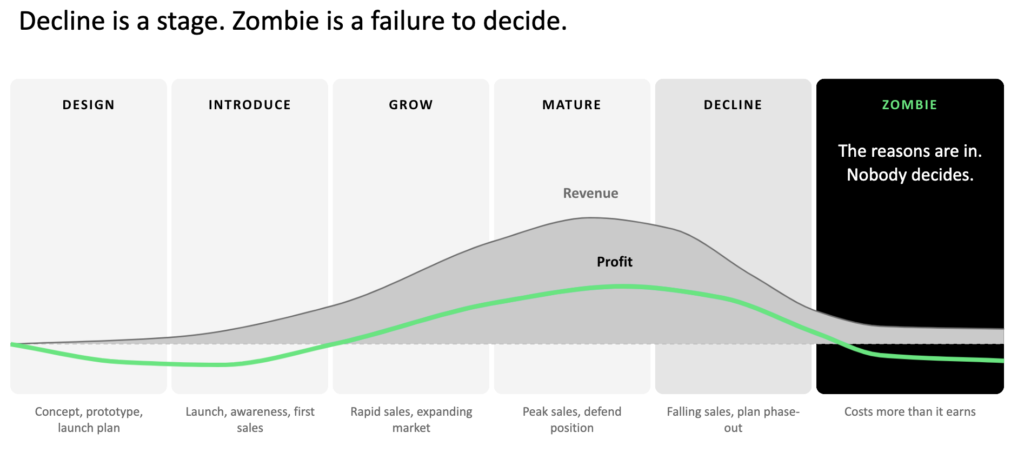
A declining product isn’t automatically a zombie either. Decline is a normal stage of the product life cycle. A zombie is what happens when the product hits decline and nobody makes a call.
So what does make a zombie?
- It still eats capacity. Engineering, support, compliance, and these days, AI tokens. I have to wonder how many feral agents some companies have running around since last year.
- Nobody would fund it today. If it showed up as a new pitch, it wouldn’t get a dime.
- Nobody owns the decision. It stays alive because no one is willing to say the word.
How products get zomb-i-fried
In my experience, products rarely become zombies through one bad call. They get there through a few familiar forces:
- Inertia. The product is part of bundles, kits, and packages, and nobody evaluates it anymore.
- Sunk cost. “We’ve spent so much on this, we can’t pull the plug now.” That’s using hope as a strategy.
- Politics. Kenny once tried to kill a product and found out the CEO had launched it as a product manager. I also see a lot of PMs dealing with the seagull manager who swoops in, vibe-codes an agent over the weekend, and leaves the team to keep it alive.
- Legacy commitments. “We can’t shut it down, Customer X still uses it!” This is where lawyers and finance get involved, and it can get messy.
Earns vs. Eats: The Hidden Cost of Products that Won’t Die
What a product earns shows up on the P&L. What it eats usually doesn’t.
I think of a zombie product like an iceberg. Leadership sees the revenue line above the water and gets excited. Below the waterline sits support, maintenance, compliance, and technical debt. I’ve heard too many engineering teams say every change breaks something and they need to start over. That’s the zombie’s bill coming due.
The biggest cost is the one nobody writes down: the next bet. I once worked with a team building agricultural drones. Customers loved their first-generation drones, but those units needed twice as many chips and cost twice as much to make. The newer models flew farther on less battery and packed in more features. The team couldn’t capture that opportunity while the factory was still building the old units.
Kodak is the cautionary tale here. Kodak invented the digital camera in 1975, then let film revenue hold back its move into digital for years. Every quarter a zombie lives, something better waits. That’s the invoice.
How to Know When to Sunset a Product
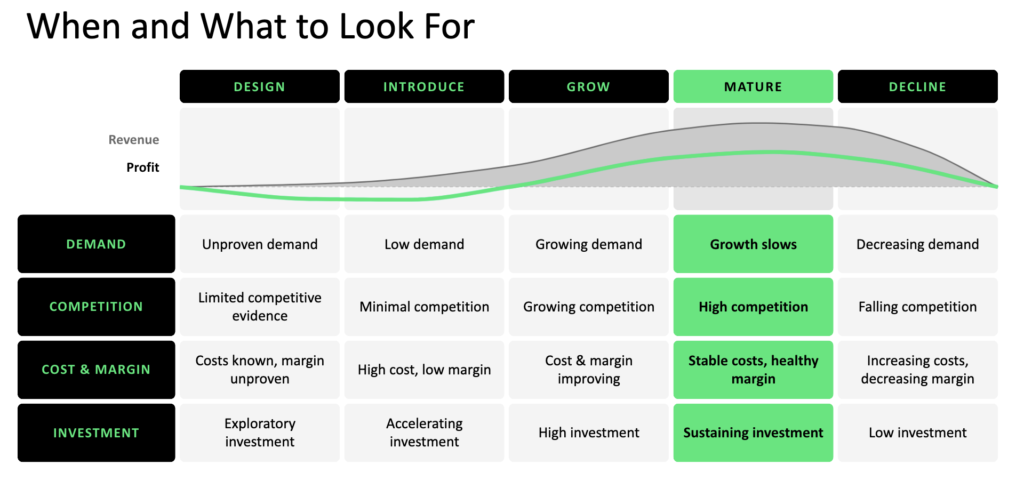
You can’t kill what you haven’t spotted, and most zombies hide in plain sight. Start by placing each product on its life cycle. I use six stages: design, introduce, grow, mature, decline, and the one nobody puts on the chart, zombie. Decline is a stage. Zombie is a failure to decide.
As a product moves through its life cycle, your goalposts need to move with it. When a product reaches maturity, start asking what decline will look like. Watch for these signals as it tips over:
| Signal | Mature | Decline |
|---|---|---|
| Demand | Growth slows | Demand drops |
| Competition | High | Falling, as rivals exit |
| Cost and margin | Stable costs, healthy margin | Costs rise, margin shrinks |
| Investment | Sustaining | Low |
Then check the product against the four good reasons to retire it:
- Money. It costs more to keep it running than it brings in.
- Strategy. The company has moved, through a new CEO, a merger, or a shift like AI, and this product no longer fits.
- Replacement. Something better exists, whether you built it or a competitor did. I feel for anyone who launched a product in late 2022.
- Market. The need is simply gone.
I suggest every product manager runs this check at least once a quarter, and monthly for fast-moving products. It also helps to instrument your products with analytics down to the feature level. At the companies I’ve worked with, that data showed me which features weren’t earning their keep, so zombies don’t always come as whole products.
Retain, Retire, Revive, Replace: Building your Strategy to Kill Zombie Products
A strong business case puts what the product earns next to what it eats. Count the support hours, maintenance, compliance work, and technical debt. Then name the opportunity you’re giving up by keeping it alive. That last number usually wins the argument.
Once you have the numbers, you have three honest moves:
- Revive it (the extension play). New demand exists, so you give the product a new life with new variants, features, or segments. Think of Arm & Hammer finding new uses for baking soda.
- Replace it (the replacement play). Something better is ready to take its place, and you run the go-to-market for the new product and the end of life for the old one at the same time.
- Retire it (end of life). The need is gone, and the product goes away.
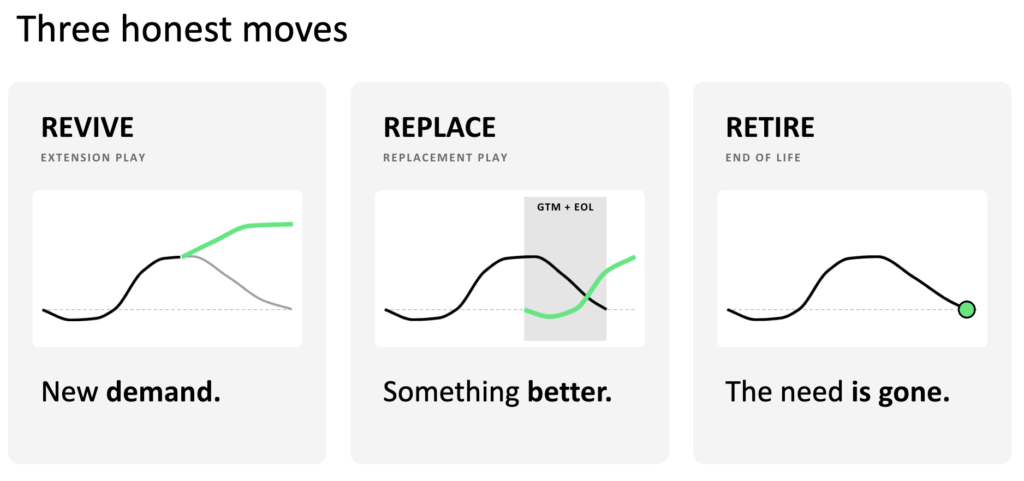
The fourth move is to retain the product as-is, if it still fits. That’s what happened to the spork.
If you’re heading toward a replacement play, start planning while the original product is still moving from growth to maturity. The drone team and a group I worked with on cryogenic labels did exactly that. They didn’t want a revenue gap where the old product dies and the team scrambles to launch the new one. They wanted the replacement already out the door and growing by the time the original reached end of life.
There’s one more option nobody likes to admit to: not deciding. Not deciding is deciding. That’s how you got a zombie in the first place. Your business case should end with one decider saying one word, out loud.
How to Retire a Product without Losing the Customer
Here’s the most important rule of the whole exercise: lose the legacy product without losing the legacy customer.
You can surprise customers, strand them, or brick their product. When Nest shut down the Revolv smart home hub, it turned devices sold with a “lifetime” subscription into paperweights. The FTC looked into it, and Nest ended up offering refunds. A proper sunset would have cost far less goodwill.
I expect we’ll see more of this soon. Plenty of AI companies spend more than they make, and when they get acquired, merged, or shut down, their customers will get very little warning.
The stages of product end of life
The better path is to warn early and offer a way forward. That takes more than an email saying, “End of life in a couple of months. Good luck.” Here’s the exit calendar I’ve run when bringing products to end of life:
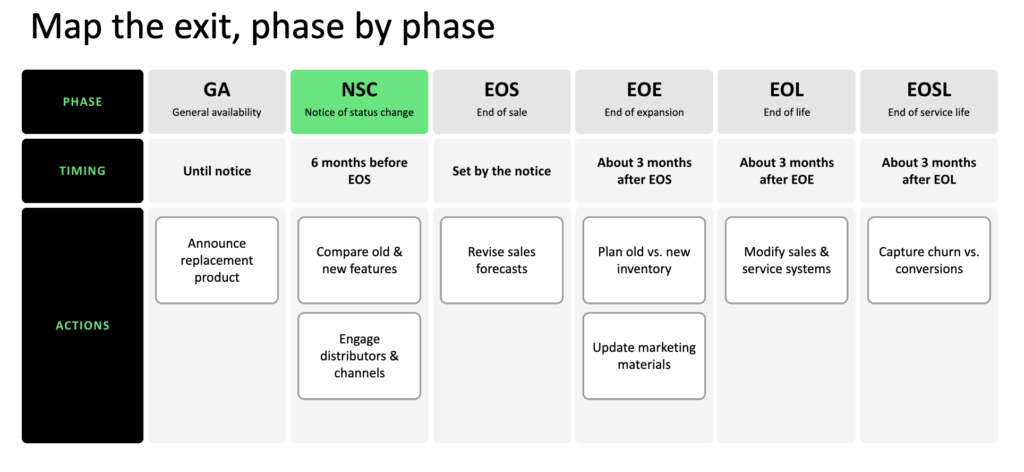
| Phase | Timing | Key actions |
|---|---|---|
| General availability (GA) | Until notice | Announce the replacement product, internally first |
| Notice of status change (NSC) | 6 months before end of sale | Compare old and new features, engage distributors and channel partners |
| End of sale (EOS) | Set by the notice | Revise sales forecasts, stop all bundling |
| End of expansion (EOE) | About 3 months after EOS | No new features, plan old versus new inventory, update marketing materials |
| End of life (EOL) | About 3 months after EOE | Update sales and service systems |
| End of service life (EOSL) | About 3 months after EOL | Honor remaining service contracts, track churn versus conversions |
Pay special attention to end of sale, which isn’t the same as end of life. End of sale stops new deals, while end of life and end of service life wind down the product and its support. Internet Explorer and GoToMyPC both had end-of-sale dates, and sales kept bundling them anyway. Many large companies publish these phases in their contract language, so customers know exactly what to expect.
When a customer’s contract outlives the product
An attendee asked what to do when one customer has a contract that runs four years past the planned end of life. Start with legal, then bring in finance, product leadership, and the account team. Look at the customer’s lifetime value and what it cost to acquire them. Your options include discounts, rebates, a subscription to something new, or keeping the product running on the cheap until the contract expires. At Citrix, we moved GoToMyPC customers to the company that had bought the rest of the GoTo line, which ran the same codebase, with a discount and no need to migrate their data.
Kenny faced the same problem with a large financial services customer. He and his account manager sat down with the client’s executives, gave them priority access to the replacement product, and built the features they’d miss into its earliest versions. They kept a customer the business couldn’t afford to lose.
Getting Stakeholder Buy-in to Let a Product Go
When we polled our webinar audience about their biggest zombie nightmare, two answers came out on top: the loudest voice wins, and we lose customers when we retire a product. Both are people problems. Killing a product isn’t only a technical battle. It’s a diplomatic and political one, and you can’t fight it alone.
Who to talk to first when you sunset a product
Talk to legal and finance first, and engineering last. Contracts, bundles, and financial projections all change when a product retires, so you need to know what you’ve promised before you change anything.
When I teach end of life in Unit 6 of Optimal Product Management, I ask the class who they’d talk to first. Most people say engineering. Some say DevOps or sales. Those answers are well intended, and they’ll get you into trouble.
Your first two stops are legal and finance, in whichever order you like. They know what you’ve promised customers in contracts, bundles, and financial projections. The last place you want to be is a deposition, explaining why you pulled the rug out from under a client with a two-year contract.
Here’s the order I’ve used:
- Legal and finance. Find every commitment before anyone else hears a word.
- Customer support and customer success. Don’t leave the people who answer the phones hanging.
- Sales and partners. Make sure they’ll stick to the end-of-sale date.
- A few key customers. Test the plan with the accounts that matter most.
- Engineering and DevOps. Bring them in last, once the plan is set.
One more tip: build your network outside the product team before you need it. When I brought GoToMyPC to end of life, the Citrix lawyers already knew me by name, because the first time they met me wasn’t me asking for a favor. That made a complicated process far easier.
Show leadership what they get back
To win over the seagull manager whose pet project this was, or the HiPPO with strong opinions about the spork, show them what the zombie is costing and what you’ll do with the capacity you free up:
- Name the capacity you’ll free.
- Pick the next bet it will fund.
- Show leadership the trade-off.
As Kenny reminded everyone, freed capacity only helps if you do something with it. Bury the zombie, then plant something worth growing in its place.
- Want the full story, including the live demo of the Zombie Survival Kit and the rest of the audience Q&A? Watch Post Launch Success Series (Part 1): How to Kill Zombie Products on demand.
- The Post Launch Success Series continues with Part 2: Pricing and Monetization for Products Out in Market on Wednesday, November 11, followed by Part 3: Post Mortem of GTM.
- Got a zombie you’ve finally put to rest, or one that just won’t stay buried? Share your story with us on LinkedIn and tag @Productside. We’d love to hear how you’re handling it.