
GitHub for Product Managers sounds like a phrase somebody from engineering says right before the Product Managers slowly begin edging toward the exits.
GitHub? That place with repositories and branches and commits and other mysterious woodland creatures? Isn’t that where developers put code?
Yes.
And your phone is technically where you make telephone calls.
GitHub for Product Managers Is Not a Coding Lesson
The interesting reason to understand GitHub has almost nothing to do with learning to code. It has everything to do with a quieter, more expensive problem your team already has, one that usually hides beneath all the tools supposedly making collaboration easier.
We keep losing the work between the work.
Right now, many of us live in a world where strategy lives in Google Docs, research is buried in SharePoint, decisions happened six months ago in Slack, and somebody’s competitive analysis lives in Confluence. Three people have four slightly different persona documents while your best AI prompts are trapped inside a private ChatGPT conversation titled something memorable like “New Chat.”
Then somebody walks into a meeting and asks, “Why did we decide this?”
And six highly compensated adults begin digging through corporate sediment, opening tabs, searching Slack threads, comparing documents, and asking who remembers what happened sometime around last March.
This is not collaboration.
This is a scavenger hunt with salaries.
The Three Collaborative Dysfunctions
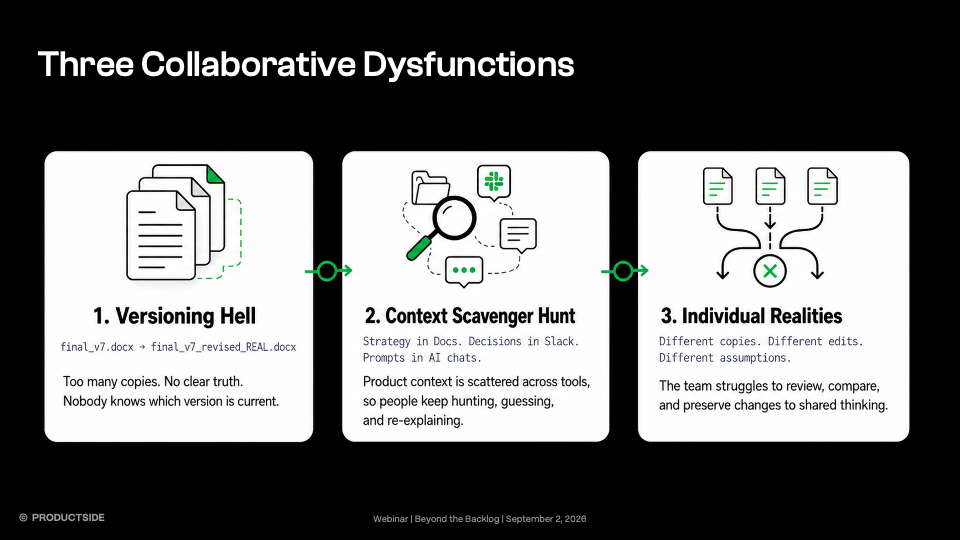
During our Beyond the Backlog webinar, we named the patterns we keep seeing:
- Versioning Hell: final_v7.docx, final_v7_REVISED.docx, and its demon offspring.
- Artifact Archaeology: strategy here, research there, decisions somewhere in Slack.
- Individual Realities: everybody has a copy, everybody has edits, nobody has the same truth.
Those three produce five predictable pains: copying context, relitigating decisions, redoing discovery, relying on memory for the rules, and losing good ideas before anyone explores them.
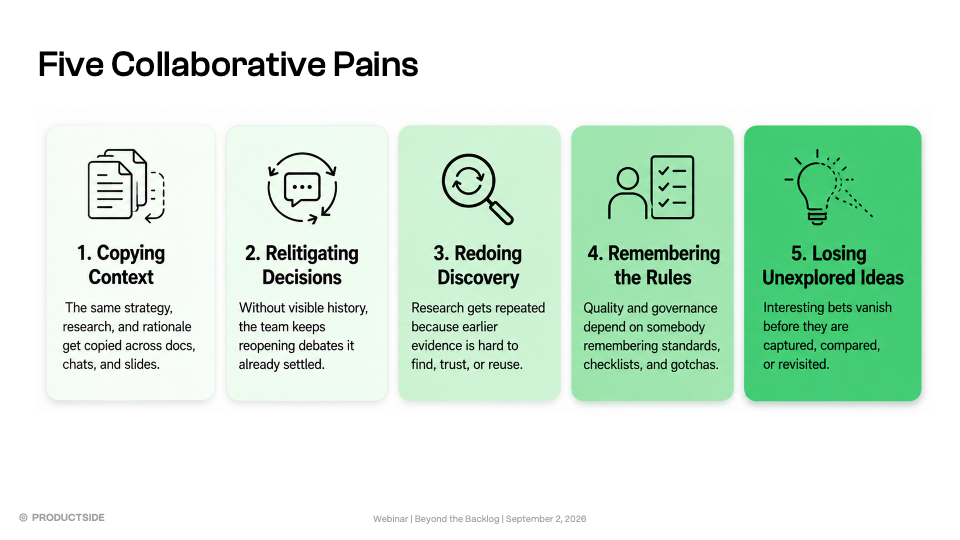
AI makes this worse because now we aren’t merely creating individual realities among people. We’re creating them with machines too.
Every Product Manager pastes slightly different context into a slightly different AI session and gets a slightly different answer from a machine that has no idea what Susan changed in the positioning document last Thursday. Then we stare at the conflicting outputs like the machine somehow betrayed us, rather than admitting we gave each instance a different version of reality.
Confident Nonsense loves a context vacuum.
GitHub Gives Change a Memory
This is not about Product Managers pretending to be software engineers. It is about borrowing some machinery software teams have used for years to solve a problem product teams increasingly have themselves.
GitHub gives us something product work desperately needs: versioned context where change has memory.
Slack is great for talking. SharePoint and Docs are great for writing and storing information. Keep them. The trouble starts when you need to answer questions those tools weren’t really designed to answer cleanly:
- What changed?
- Why did it change?
- What did we believe before?
- Who reviewed this?
- Which version should the team … and its AI … actually trust?
GitHub was built around exactly that kind of change.
Which turns out to be pretty damn useful for product work.
Give the AI the Same Context as the Team
Think about how most AI workflows begin.
Paste the product background. Paste the persona. Paste the strategy. Paste the research. Paste the giant prompt somebody posted on LinkedIn between a photo of themselves pointing at a whiteboard and the phrase “STEAL MY SYSTEM.”
Tomorrow, do it again.
Then your teammate does roughly the same thing, only using last month’s persona, a different strategy document, and the prompt somebody else “improved” during a late-night encounter with Claude.
This is Context Hoarding Disorder, with copy-and-paste as the treatment plan.
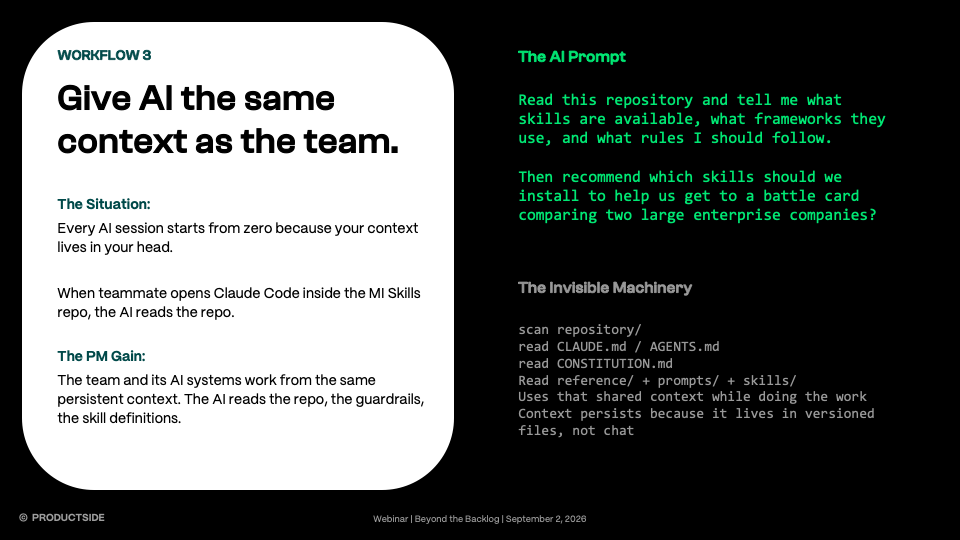
In the webinar we showed an alternative: a shared Market Intelligence skills repository where methods, prompts, research conventions, and guardrails live in versioned files. The Product Manager works there. Their teammates work there. An AI harness running inside that repository reads the same context.
Now the AI doesn’t arrive at every session as a talented stranger fresh from the airport, smiling politely while everybody spends twenty minutes explaining who the customer is and why the company exists. It walks into the room having already read the briefing book.
That doesn’t make it right.
It makes it less contextually stupid.
Branches, Commits, and Pull Requests: The Names Are Worse Than the Ideas
A branch is simply a safe place to try a change without screwing up the version everybody already trusts.
Or, in plain English:
A safe place to be wrong before the team decides you’re right.
Say your team has a competitive battle-card method everyone uses. Your resident expert tries it and says, “It’s accurate, but sellers won’t use it. It reads like an intelligence report written by somebody hiding behind a newspaper in a Vienna train station.”
Fair.
They could edit the shared version directly, but please don’t. They could create battle-card-FINAL-v2-DEAN-EDIT.docx … but dear God, no.
Or they create a branch, leaving the trusted version untouched while they build and test a better one.
That isn’t really a programming idea.
It’s a learning idea.
When the change looks useful, they make a commit: a labeled checkpoint of the work and the reasoning. Six months later, anyone can see the method changed because field feedback showed sellers needed a faster read, stronger competitive responses, and less intelligence jargon. Not because Samir vaguely recalls somebody saying something after lunch.
Without that history, teams wind up in one of my least favorite product rituals: relitigating the decision nobody remembers making. Forty minutes into the debate, somebody finally finds the old document and says, “Oh. We already decided this.”
Wonderful. Glad we burned half a meeting rediscovering our own brain.
Velocity without memory is just amnesia at scale.
Then comes the pull request, where the team sees exactly what changed, challenges the assumptions, requests revisions, and approves or rejects it before anything becomes the new trusted version.
The branch is a proposal. The merge makes it shared truth.
Apply that past code and into research templates, interview guides, evaluation criteria, AI skills, working agreements, and reusable product methods, and your collective product knowledge stops behaving like recipes everyone keeps in their own kitchen drawer.
Now it can actually compound.
Your Quick Win: GitHub for Product Managers in Five Steps
Please don’t leave this article and announce that your entire product org moves to GitHub on Monday. That is how religions start.
Pick one thing: an artifact your team reuses, changes regularly, and occasionally argues about. Then:
- Put the trusted version in a repository.
- Let a team member improve it on a branch.
- Capture what changed and why in a commit.
- Review the proposed change together.
- Merge it only when the team agrees the new version is better.
You aren’t testing whether Product Managers can “do Git.”
You’re testing whether versioned collaboration helps your team think, learn, and reuse knowledge better.
Don’t Replace Everything. Add What You’re Missing.
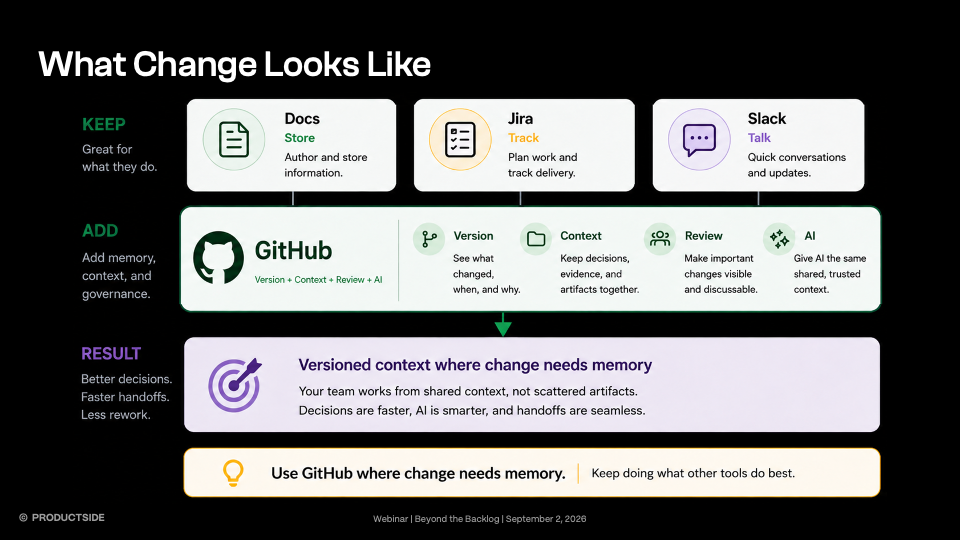
Keep Docs where Docs work. Keep Slack where Slack works. Keep Jira doing whatever Jira does while we’re not looking. But lean into GitHub where collaborative change needs a persistent and detailed memory.
We’re getting extraordinarily good at generating more: more prompts, more research, more drafts, more artifacts, more AI-produced stuff piled on top of the stuff we already weren’t keeping track of particularly well.
But generating more crap faster was never the goal.
The goal is building on what you already know without rediscovering it, re-pasting it, or asking an AI to reconstruct institutional knowledge from whatever happened to fit inside today’s context window.
Not another blank chat box. Not another final_FINAL_v3. Not another little island of truth.
Context is work. If the work keeps changing, give the change a memory.
- Want to see the machinery instead of reading about it? Watch our webinar, Beyond the Backlog, where we walk the whole workflow: shared repositories, AI skills, branches, commits, pull requests, review, reuse, and governance.
- Want to try it this week? The companion project has the prompts, diagrams, and safety guidance. Or the marketing intelligence repo we demonstrated live during the webinar. And for those who want to dive deep, there’s GitHub’s own Discussions documentation explains where open questions live versus committed work. Tag us on Linkedin and let us know what your experience was like.
- Want to go deeper? Productside’s product management courses and advisory programs turn scattered AI experimentation into repeatable team workflows.